


osu!stream
2.9169.00 Reviews
App Specs
- Version
- 2020.1
- Updated On
- License
- Free
- Downloads
- 1,000,000+
- Developer
- ppy Pty Ltd
- Categories
- Music
- Platform
- Android, iOS
Screenshots
 Analysis by AppCompare
osu!stream is a rhythm game that asks for more than simply tapping along to music. I found myself switching between taps, slides, holds, and spins as each track changed its demands. That variety gives the game a more active feel than a basic music player with a score attached, although it also makes the experience less relaxed than some mobile rhythm games.
Developed by ppy Pty Ltd, it sits firmly in the music category and is free to install. Its age rating is Everyone, so it is easy to consider for a family device or for someone who wants a quick music-focused game without paying at the starting point. The game has passed one million installs, which suggests that it has reached a sizeable audience, even though its average rating is a modest 2.9 from roughly four and a half thousand ratings.
How the rhythm play feels in everyday use
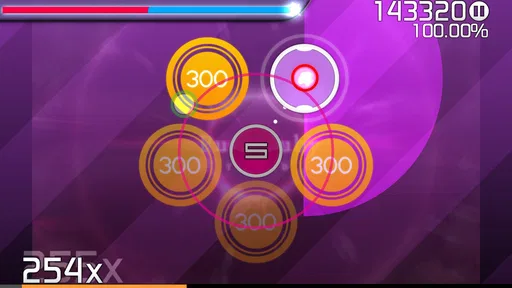
The central appeal is the physical variety of the controls. A tap tests timing, a slide asks me to follow a moving direction, a hold rewards keeping contact for the right duration, and a spin changes the pace of interaction again. I like that the game makes me pay attention to the whole screen rather than stare at one fixed button.
That design also creates a clear learning curve. A new player may understand the idea immediately but still need time to coordinate both hands and recognize what is coming next. The challenge is not just hearing the beat; it is translating the beat into the correct gesture before the next note arrives. When I am focused, that connection feels satisfying. When I am tired, a short mistake can quickly turn a promising run into a frustrating one.
A realistic use case is a short break when I have only enough time for a few attempts. The format suits that kind of session because the interaction begins quickly and the objective is obvious. I can play while waiting for an appointment or during a commute, provided I am somewhere that allows me to concentrate on the screen. It is not the sort of game I would choose while multitasking, because the gestures demand attention and a missed visual cue matters immediately.
The touch controls are the reason to try it, but they are also the main source of friction. Small screens can make simultaneous actions feel crowded, especially when my fingers cover the next target. Players with larger phones may find the layout easier to read than those using compact devices. The minimum operating-system requirement is Android 4.4, which makes the game accessible to older Android hardware, although compatibility alone does not guarantee that every device will feel equally comfortable for fast play.
Learning the patterns instead of chasing every note
My most useful approach was to treat early attempts as practice rather than as score attempts. I watched how the game introduced each gesture and concentrated on identifying the difference between a short action and one that needed to continue. Trying to recover from every mistake often caused more mistakes, so I found it better to reset my attention on the next beat.
Worth Reading Before You Choose

EA SPORTS FC Mobile 26 Is a Bigger Football Game, but It Takes Time

Flipboard Shows What News Apps Must Do Beyond the Feed

Switching to Android Auto Means Rethinking Your Driving Routine

Google Calendar Makes a Crowded Week Easier to Manage

Ludo King Makes the Most of the Minutes Between Plans

Baby Panda World Brings Quick Play to Modern Phones, but Its Game Library Feels Busy
For beginners, sound and sight need to work together. Listening alone is not enough because the required action may arrive slightly differently from the musical emphasis I expect. Watching the note path is equally important, but staring only at the screen can make the music feel disconnected. The best results came when I used the track as a timing guide and the visual pattern as the instruction.
One practical tip is to keep the phone steady rather than holding it loosely in one hand. The game benefits from predictable finger movement, and an unstable grip makes slides and spins harder to control. I also recommend playing with clean, dry fingers and enough screen space around the device. That sounds minor, but touch rhythm games punish small physical distractions more than turn-based games do.
Another useful habit is to separate improvement from entertainment. If I replayed a difficult section immediately after failing, I could learn its pattern, but repeated attempts also made the session tense. Taking a short pause helped me return with better timing. This is especially relevant for players who are sensitive to score pressure: the game can be enjoyable as a musical challenge, but it is less pleasant when every attempt becomes a test of perfection.
Progress without turning every session into a purchase decision
The free price is important because it lowers the barrier to trying the game. I can see whether the gesture system suits me before spending anything. For a music game, that matters more than it might in a slower genre: if the timing or visual style does not feel natural, no amount of extra content would fix that basic mismatch.
I would not approach it expecting a shopping-heavy mobile experience based on the information available about its price. The sensible decision is to evaluate the free version on its own terms. If the core rhythm interaction is not enjoyable, there is little reason to continue simply because the game has a recognizable name or a large install count.
At the same time, players who want a broad, constantly expanding music library should compare their expectations with what this particular release offers before committing serious time. I would choose a larger rhythm platform when my priority is discovering many songs, following a live-service schedule, or building a long-term collection. I would choose this game when the priority is direct touch control and the satisfaction of mastering patterns one track at a time.
That distinction helps prevent an unfair comparison. A music streaming service with interactive elements is not the same product as a focused rhythm game. Likewise, a casual tap game may be easier to pick up, but it will not necessarily provide the same combination of slides, holds, and spins. The right alternative depends on whether I want musical variety, relaxed play, or demanding coordination.
Where the pressure comes from
The main pressure is performance pressure rather than spending pressure. Every visible mistake can feel immediate, and the control variety means that a player may understand the song but still fail because one gesture was late or incomplete. I appreciate that the challenge is tied to skill, yet I can also see why the average rating is not especially strong. Rhythm games often divide players sharply: some enjoy repeating a pattern until it clicks, while others find the same repetition exhausting.
I would skip it if I wanted a calm background game that I could play with one thumb while watching something else. I would also be cautious about recommending it to someone who dislikes restarting difficult sections or who becomes annoyed by small touch-control errors. The Everyone rating describes its broad age suitability, not its difficulty level or its ability to provide a gentle experience.
For a young player, the game may be approachable in theme while still requiring patience. An adult choosing it for a child should focus less on the age label and more on whether the child enjoys rhythm practice and repeated attempts. For an older player using an older phone, the low minimum Android requirement is encouraging, but screen size and touch responsiveness may matter more than the operating-system version.
Fairness when scores are the main reward
From a fairness perspective, the strongest part of the concept is that the meaningful challenge comes from timing and coordination. A player who improves through practice can feel that progress directly. That is more satisfying than a system where advancement depends mainly on collecting upgrades or paying for an advantage.
Still, fairness in a touch rhythm game is not only about the rules. Hardware can influence the experience. A responsive, spacious screen may make rapid gestures easier than a small or aging device. That does not necessarily mean the game is unfair by design, but it does mean that two players can face different levels of physical comfort while attempting the same pattern.
I also would not treat public ratings as a direct measure of competitive fairness. The 2.9 average reflects the overall experience of thousands of raters, but it does not tell me whether people disliked the controls, the available music, the difficulty, or technical behavior on their devices. The figure is useful as a warning to keep expectations measured, not as proof that the scoring system itself is flawed.
For players who want a serious competitive environment, I would compare this with a rhythm game that clearly centers on ranked play, tournaments, or a large active community. osu!stream is more appealing to me as a personal timing challenge. I can compete against my own consistency without needing the game to provide a formal competitive ladder. That is a strength for private practice, but a limitation for anyone looking for a deep multiplayer scene.
What I would check before making it a regular game
The current version is listed as 2020.1, and the game was released on December 14, 2022. Those details matter because mobile players often assume that a rhythm title will receive the same kind of ongoing content flow as a newer service-based game. I would install it to test the existing experience rather than assuming that a steady stream of fresh material is part of the deal.
I would also pay attention to how the game feels on my exact phone during the first few sessions. A rhythm game can seem excellent in principle but become uncomfortable if the touch response, screen proportions, or visual clarity do not suit the device. This is one of the few genres where a small amount of delay or awkward finger placement can change the entire impression.
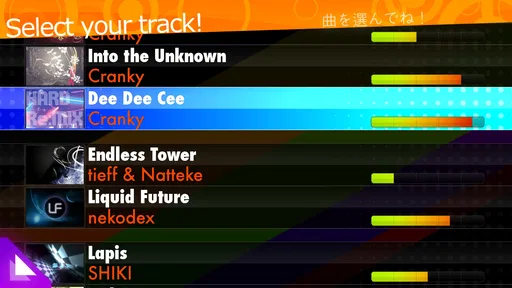
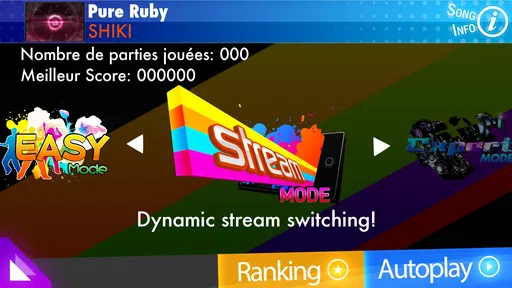
The public store picture leaves room for practical questions that I would answer through direct use rather than guesswork. The free price is clear, and the age rating is Everyone, but I would not assume that those labels explain every aspect of the experience. I would check the opening session, try several gesture types, and decide whether the game gives me enough enjoyment without building expectations around features that are not clearly part of its presentation.
That cautious approach is especially sensible because the review count is much smaller than the install total. There are 169 written reviews alongside the broader rating figure, so the visible comments may not represent every kind of player or device. I would read them for recurring patterns, then test the game myself instead of letting one enthusiastic or angry comment make the decision for me.
Who gets the most from it
I think the best audience is someone who likes music games for their tactile challenge. If you enjoy learning visual patterns, repeating a track to improve timing, and switching between several touch gestures, the design has a clear reason to exist. It is also a reasonable choice for someone who wants a free trial of a rhythm concept before considering more elaborate alternatives.
It is less suitable for players whose main goal is a huge song catalogue, social competition, or a relaxed one-handed pastime. Those needs point toward different kinds of music apps and games. Choosing another option is not a criticism of this one; it simply recognizes that a focused touch challenge cannot serve every rhythm-game audience equally well.
I would also avoid recommending it as a guaranteed fit for someone with limited dexterity or visual difficulty without first testing the controls. The game asks for quick, distinct gestures, and the compact interface may not be comfortable for every player. The Everyone rating makes it broadly accessible in age terms, but accessibility in practice depends on the individual and the device.
For a friend who already enjoys challenging rhythm games, I would describe it as a compact experiment worth trying for free. For a friend who wants music to sit quietly in the background, I would point them elsewhere. That is the clearest dividing line I found: this is about active participation, not passive listening.
My trust verdict after weighing the trade-offs
I trust the game most when I judge it by its core interaction: tapping, sliding, holding, and spinning in time gives it a distinct identity. The developer, ppy Pty Ltd, is clearly associated with the title, and the free entry point makes a personal test straightforward. I do not need to spend money to discover whether the control style works for me.
My confidence is more measured around long-term expectations. The modest average rating, the limited number of written reviews, and the age of the listed version encourage me to see it as an existing rhythm experience rather than automatically treating it as a continually developing platform. That is not a reason to reject it, but it is a reason to judge what is on the screen today.
In the end, I would recommend osu!stream to players who want a focused, gesture-heavy music game and are comfortable improving through repetition. I would not recommend it to someone seeking a broad music service, a low-pressure casual diversion, or a clearly defined competitive ecosystem. Its free price, Everyone rating, and support for older Android versions make trying it easy; its demanding touch play and mixed public reception make deciding to keep it a personal matter.
My final advice is simple: install it for the rhythm mechanics, not for assumptions about future content or competition. Give the opening sessions enough attention to learn how the gestures feel on your phone. If the connection between the music and your fingers becomes satisfying, the game can earn a place in short practice sessions. If the controls feel cramped or the repeated attempts become stressful, moving to a more relaxed or more content-rich alternative will be the better choice.
Pros
- Fast
- responsive rhythm gameplay designed for short sessions.
- Multiple difficulty levels make it approachable for new players.
- Original songs and charts provide strong replay value.
- Offline play is convenient when no internet connection is available.
- Clean interface keeps the focus on timing and note patterns.
Cons
- The small song selection can feel limited compared with larger rhythm games.
- Later difficulty levels demand very precise timing and quick reactions.
- Touch controls may feel cramped on smaller phone screens.
- The game offers limited customization compared with newer rhythm titles.
- Some players may find the presentation and interface dated.
FAQs for osu!stream
What is osu!stream?
osu!stream is a rhythm game inspired by the popular osu! franchise, designed specifically for touchscreen devices. Instead of simply tapping one type of note, it combines taps, holds, sliders, streams, and other patterns that require timing and coordination. The game focuses on fast, energetic gameplay and offers a selection of handcrafted songs and beatmaps suitable for short sessions or repeated practice.
Is osu!stream free to download and play?
osu!stream has traditionally been available as a free mobile rhythm game, although availability can vary depending on your device, region, and the current app-store listing. The original version was associated with iOS and may not be officially available on every modern Android device. Before downloading, check that the source is legitimate, review the listed requirements, and avoid unofficial packages that could contain modified or unsafe files.
Does osu!stream require an internet connection?
The core gameplay of osu!stream is generally designed to work offline once the application and its available content are installed. This makes it convenient for playing during travel or when mobile data is unavailable. An internet connection may still be needed for downloading the app, receiving updates, accessing store services, or checking compatibility. Features and availability can differ between older and newer versions.
Is osu!stream difficult for beginners?
osu!stream can feel challenging at first because its charts demand accurate timing and quick reactions, especially during dense note patterns and faster sections. However, the game is approachable if you begin with easier songs and gradually increase the difficulty. New players should practice using headphones, keep the screen clean, and focus on rhythm rather than trying to rush through every note.
What devices are compatible with osu!stream?
Compatibility depends heavily on the version of osu!stream and the operating system installed on your device. It was created for touchscreen mobile devices, with the best experience usually coming from a phone or tablet that responds accurately to rapid taps and swipes. Older applications may not be listed for newer systems, so confirm the official store requirements before attempting installation.


